Overview
An overview for Azure landing zones, Sovereign landing zone as a variant of an Azure landing zone and where it sits in the Microsoft Sovereign Cloud portfolio, plus Azure Verified Modules in the Terraform Registry. Then a summary of what is in these labs.
Introduction
There is a lot of content in these labs, and it will make more sense if you know how the moving parts are connected.
This page will help you to understand how Azure Landing Zones (and Sovereign Landing Zones) make use of the library format and the Azure Verified Modules in the Terraform Registry, and how we use the ALZ Accelerator to speed up and standardise the deployment process. This will be a brief introduction to help level set, and you can expect to find a lot of friendly URLs to take you through to the official Microsoft documentation.
In the last section we will then run through the structure of the labs so that you understand the flow.
Azure landing zone
The Microsoft Cloud Adoption Framework gives guidance for partners and customers to adopt Azure, integrate with their existing IT infrastructure and migrate and modernize workloads. The main documentation area is https://aka.ms/caf and the overview page is recommended reading.
Diagram showing the phases of the Cloud Adoption Framework:

The third stage of the Cloud Adoption Framework (after Strategy and Plan) is Ready, and this is the focus of these labs. The Ready stage covers a number of topics, and one of those the guidance for creating a landing zone for Azure workloads to be migrated or deployed to.
Here is a generalised view of a landing zone:

The landing zone is split into a platform landing zone - which covers management group structure and associated governance policy guardrails plus shared services for connectivity, identity, management, and security - and the multiple application landing zones which are deployed under the management group structure - inheriting the policies from the management groups above - and used for the workload resources themselves.
The guidance here is generalised and many organisations have created their own definitions to meet the guidance, often using infrastructure as code. However, many pushed Microsoft to provide IP to accelerate and standardise a landing zone, and, to cut a long story short, we now have the Azure landing zone (and the Sovereign landing zone variant) as opinionated platform landing zones.
Azure Landing Zone reference architecture:

Note that this is a full implementation with resource in all of the platform landing zone subscriptions, plus a selection of application landing zone subscriptions, sandbox etc. Note that there is a smaller and more cost conscious SMB variant released.
Note that these pages focus purely on the management groups and the management subscription. The resources for the connectivity, identity and security subscriptions are out of scope, as are the application landing zones.
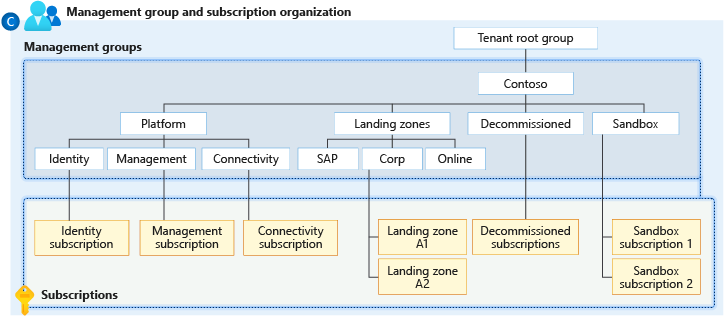
This focus matches the remit of the labs, which is to help on the organisation and the governance for standard and sovereign scenarios.
Many of the partners that I work with have their own infrastructure as code for the platform landing zone resources and are happy to continue using that. However, keeping up to date with policy governance in the fast changing world of compliance is challenging when you go your own route.
The modularity of the Azure Verifiable Modules approach - more on that later - gives partners the option to switch to the Azure landing zone policy approach and take advantage of the continual work being done by the Microsoft team. They can then choose how to deploy the other resources into the platform subscriptions such as connectivity.
Sovereign landing zone
So, what about the Microsoft Sovereign Cloud?
When we make architectural decisions on Azure we already consider areas such as cost, security, identity and access management, performance, resiliency and more. These are then applied to the whole environment, or are part of the tradeoffs we apply to individual workloads when considering the Well-Architected Framework.
Digital sovereignty - addressing requirements around data sovereignty, operational sovereignty and AI sovereignty - introduces a number of new scenarios, considerations, and compliancy requirements that extend the architectural decision points and the continuum of options available across the Microsoft Sovereign Cloud.
Some specific compliancy requirements will push certain customers to specific sovereign clouds. For example, French public sector customers that need to meet SecNumCloud compliancy will consider the National Partner Cloud run by Bleu.
Most Microsoft customers with additional sovereignty requirements will determine their high level sovereign requirements and then determine which workloads require additional configuration to achieve the applicable level of sovereignty. Those workloads are likely to be spread across Sovereign Public Cloud and Sovereign Private Cloud. This applies to more than Azure and Azure Local as Microsoft 365, Power Platform and other Microsoft cloud services come into play, but the focus here will be on the Sovereign landing zone, which extends the Azure landing zone with additional management group and additional policy assignments to provide sovereign guardrails.
The Microsoft documentation for Sovereign landing zone is https://aka.ms/sovereign/slz. Here is the diagram showing the Management Group Hierarchy with Controls & Principles.

You will notice there are additional sovereignty specific policies being defined and assigned (in addition to the comprehensive set of standard ALZ policies). There are also three new management group scopes that are shown in bold.
-
Public
New management group scope that is only subject to the additional policies enforcing data residency and therefore limiting jurisdictional exposure. These are assigned at the top ALZ scope, shown as Contoso in this diagram. This management group is not allowed to connect via Virtual Network Peering, keeping it isolated from the corporate network.
-
Corp / Online
Existing management groups for enhanced data sovereignty on workloads. There is a stronger set of data-at-rest and data-in-flight encryption requirements in addition to the inherited data residency policies.
-
Confidential Corp / Online
Two new management groups for the most sensitive workloads, with the use of Azure Confidential Computing to additionally use encryption of data-in-use. Also adds additional limitations on public IPs.
Note that a set of complementary labs have been created for Customer Managed Key (CMK) sovereignty scenarios to help get up to speed with choosing the right key store, encrypting data at rest, and encrypting data-in-use at both the platform and application level.
Libraries
The Azure Landing Zones (ALZ) Library is a repo structure of governance resources defined in JSON (with partial support for YAML) used by Azure landing zones to define the management group structure and the governance defined there. The library format was defined by Microsoft’s Customer Architecture and Engineering (CAE) team as a standard.
There are numerous clients that use it, including Bicep and the Azure Portal, but the scope is reduced on these pages to the alz Terraform provider and the AVM modules. More on these soon.
The default repo is https://aka.ms/alz/library and this has a link to the core documentation. The library contains three core platform libraries:
platform/alz- Core Azure landing zoneplatform/slz- Sovereign landing zone (dependant on platform/alz)platform/amba- Azure Monitor Baseline Alerts
These are all frequently updated and version numbers are used on each release.
A library may include the following core assets:
- policy definitions
- policy set definitions
- policy Assignments
- custom RBAC role definitions
These are then collated as named archetypes. The archetype_overrides are used to create variants of the core archetypes. The archetypes are then signed to the management group scopes defined in the architecture. These also define the management group hierarchy. Optionally there is a policy default values file used where the same parameter values can be reused and mapped to the parameter names used in multiple policy assignments. Finally there is a metadata file that defines the name and description and any dependencies on other libraries.
Each file in a library is defined by a schema and the alzlib Go module at the heart of all of the clients is specific about the naming convention of the files. As mentioned, the library supports full customization, allowing you to override archetypes or modify implementations. You can also have multiple library references and dependencies, opening up the ability to have:
- Custom partner libraries
- Country and industry-specific packs to address sovereignty requirements
These labs will help to understand how to use the provided libraries, customise them, or create your own custom libraries.
Historically you could have accused Azure landing zone of being monolithic, forcing you to choose between fully adopting the solution and falling in line with the Microsoft approach, or forging your own path and developing your own platform landing zone infrastructure as code standards including policy.
Now the combination of Azure Verified Modules and the Azure landing zone library approach allows a new level of choice, customisation, and modularity. You can leverage as much or as little of Microsoft’s Azure Landing Zone as you want. And then you can extend, augmenting and override that baseline with your own IP and definitions for a true level of flexibility.
These labs are designed for partners who need to deeply understand how ALZ works — particularly those with existing landing zone IP or custom Azure Policy guardrails. I’ve come at this from the perspective of partners who already have their own platform landing zone assets but want to take advantage of the policy content in the ALZ library in the knowledge that will be actively updated over time.
For many partners this is the best of both worlds.
Terraform
The Azure landing zone and Sovereign landing zone are intended to be used by multiple clients, including Bicep. These pages focus purely on Terraform as a client, so in this section we will run through the alz provider, Azure Verified Modules, and the AVM modules in the Terraform Registry. Again, everything in this section is the product of the CAE team that created the library format.
The alz provider
The Azure landing zone library format is read on Terraform using the alz provider and then used by the Azure Verified Module. (See below.)
The alz provider is relatively simple. Its role is to download the library (or libraries) locally, into the ./alzlib folder. The folder should be excluded from your public Git provider (e.g. GitHub, Azure DevOps, etc.) using .gitignore.
It supports multiple libraries, and those libraries can also recurively pull in their own library dependencies. Most of the optional argument for the provider relate to authentication, but there are two important arguments that control behaviour.
library_fetch_dependenciescontrols whether to recursively download any dependencies found in a library’s metadata file. (Default istrue.)library_overwrite_enabledcontrols whether assets can be overwritten by other libraries. (Default isfalse.)
Azure Verified Modules
The home for Azure Verified Modules (AVM) is https://aka.ms/avm. Here you will find information on the initiative and the various resource and pattern modules that are combined to create more complex infrastructure as code deployments.
AVM has fundamentally changed the delivery of Azure landing zones, and it is more modular and better supported than ever before. There is a specific ethos behind the design and implementation of the modules and they are used for many of the platform and workload accelerators.
There is nothing stopping you from combining the AVM Terraform modules with your own Terraform config and modules, and therefore this is more appealing to partners who have defined their own infrastructure as code IP.
Terraform registry
There are five AVM modules for Azure landing zones in the Terraform registry. Each of these has an extensive documentation page, plus a selection of examples in the drop down at the top.
-
The core module for deploying management groups, policies definitions and assignments, and customer RBAC role definitions. This is the module that uses the alz provider and the local .alzlib folder it generates. This registry search shows all of the modules starting with Azure/avm-ptn/alz.
-
Deploys the standard Azure landing zone resource for the management subscription, such as an Azure Monitor Log Analytics Workspace for resource diagnostics, Data Collection Rules for Azure Monitor Agent, etc. This module works hand in hand with the avm-ptn-alz module as these resources are required by some of the Azure landing zone’s policies.
-
Azure/avm-ptn-alz-connectivity-hub-and-spoke-vnet
The first of two provided modules for the connectivity subscription. This one provides plenty of options for deploying standard hub and spoke resources, including gateways for ExpressRoute and VPN, Private DNS Zones and Private DNS Zone Resolver, Azure Firewall, Azure Bastion and more. Supports single and multi region deployments.
-
Azure/avm-ptn-alz-connectivity-virtual-wan
This module is for those taking the Azure Virtual WAN path for connectivity, including support for Azure Firewall, Azure Bastion, and sidecar virtual networks for NVAs and other resources that are not supported in the main hub. Supports, minimal configs through to complex multiregion deployments with many network connections.
-
Azure landing zones inherited many of the design concepts from enterprise-scale landing zones, and one of those was the use of subscriptions as a scaling element and a strong scope for RBAC role assigmments. Subscription vending is a recommended mechanism for dynamic environments.
ALZ Accelerator
The ALZ Accelerator is used by customers, partners, and Microsoft’s own Factory to accelerate deployments of Azure landing zones. Use of the ALZ accelerator is not mandatory, but there are two core benefits of using the accelerator:
- Defines a best practice recommendation for CI/CD of your infrastructure as code configurations, including repo branch protections, approval processes and custom pipeline definitions; use of OpenID Connect and least privilege Managed Identities, and more. Supports configuration of GitHub, Azure DevOps, or local filesystem.
- A system generated config for either Bicep or Terraform using the Azure Verified Modules. A number of default scenarios are supported via the starter modules. For Terraform this includes single or multi region deployments, hub and spoke or Azure Virtual WAN, and Azure Firewall or NVA, as well as the simple management group only configuration.
The official ALZ Accelerator documentation covers all of the various options and customisation.
These labs are geared towards partner understanding of the policy and Azure landing zone library elements of the solution, and specific options have been assumed to narrow the focus.
- Terraform is assumed and Bicep is not included
- GitHub is assumed and Azure DevOps is not currently included
- None of the starter module scenarios are selected - instead we are using a custom one called
empty
This approach allows us to take advantage of the CI/CD standards and benefits, whilst forcing us to build up a management group and management config manually using the examples in the Terraform module documentation. This is for deeper enablement so that partners are in a better position to support customisation needed for different go to market scenarios and customer requirements.
What is in these labs?
The Azure landing zone and Sovereign landing zone areas contain linked lab series that are designed to help you go deeper on Azure policy at scale. Here is a quick overview of what they cover.
-
Overview
A brief overview of the various moving parts with Azure landing zones and Sovereign landing zones. Start here!
-
Run the ALZ Accelerator
This series focuses purely on the ALZ Accelerator and the intention is to create a working CI/CD pattern that is suitable for a production environment. Note that the ALZ Accelerator is also usually used to generate the starter configs, but these pages intentionally create an empty config, ready for the next stage.
-
Deploy an Azure or Sovereign landing zone
You will start with that empty config created by the ALZ Accelerator. The idea is to build up your knowledge on how the Azure Verified Modules (AVM) are used to deploy the core Azure Landing Zone management group and management configurations. Learn about the Azure Landing Zone pattern modules in the Terraform Registry, including the examples you can reference to build up your own config. Learn how to add in a custom library so that you can override the archetypes in the ALZ library.
-
Understanding libraries
OK, time to backtrack. The ALZ platform library (plus SLZ and AMBA) are core to how this all works, and you can create your own ALZ libraries as well, which can be very useful for partners. This allows you to create your own custom libraries if you want to offer a standard set of additional policy controls for customers, or policy packs for sovereign requirements in specific regions or industries. This deep dive will take you into the assets and constructs, plus some useful commands for testing that your custom policies and RBAC role definitions are valid JSON.
-
Reference configs
OK, so now you have the core understanding. But you don’t want to have to read through all of the pages if you come back at a later point, you just want to get straight to the core info and see how your files should be configured for different library scenarios. Here are a few pages for you to reference.
Next
OK, that should have given you a decent overview of what we are covering here. Enjoy!