Azure Citadel
  • Blogs

  • Azure Arc
    • Overview
    • Azure Arc-enabled Kubernetes
      • Prereqs
      • Background
      • Deploy Cluster
      • Connect to Arc
      • Enable GitOps
      • Deploy Application
      • Enable Azure AD
      • Enforce Policy
      • Enable Monitoring
      • Enable Azure Defender
      • Enable Data Services
      • Enable Application Delivery
    • Azure Arc-enabled Servers
      • Prereqs
      • Scenario
      • Hack Overview
      • Azure Landing Zone
      • Arc Pilot resource group
      • Azure Monitoring Agent
      • Additional policy assignments
      • Access your on prem VMs
      • Create onboarding scripts
      • Onboarding using scripts
      • Inventory
      • Monitoring
      • SSH
      • Windows Admin Center
      • Governance
      • Custom Script Extension
      • Key Vault Extension
      • Managed Identity
    • Useful Links
  • Azure CLI
    • Install
    • Get started
    • JMESPATH queries
    • Integrate with Bash
  • Azure landing zone
    • Overview
    • Run the ALZ Accelerator
      • Prereqs
      • Elevate
      • Bootstrap
      • Demote
      • Browse the deployed resources
    • Deploy an Azure landing zone
      • What is the Azure landing zone?
      • Create an initial ALZ config
      • Add a local override library
      • Test locally
      • Run through the CI/CD workflow
    • Understanding libraries
      • What is a library?
      • Policies, Assignments and Roles
      • Archetypes, Overrides and Architecture
      • Metadata and Policy Default Values
      • Custom libraries
    • Reference configs
      • Azure landing zone library
      • Azure landing zone library with overrides
  • Azure Lighthouse
    • Minimal Lighthouse definition
    • Using service principals
    • Privileged Identity Management
  • Azure Policy
    • Azure Policy Basics
      • Policy Basics in the Azure Portal
      • Creating Policy via the CLI
      • Deploy If Not Exists
      • Management Groups and Initiatives
    • Creating Custom Policies
      • Customer scenario
      • Policy Aliases
      • Determine the logic
      • Create the custom policy
      • Define, assign and test
  • Customer Managed Keys
    • Sovereignty scenarios
    • Key management options
    • 🧪 Azure Key Vault Premium
    • L2: Encryption at rest with CMK
    • 🧪 CMK for Storage
    • 🧪 CMK for VM Disks and AKS
  • Marketplace
    • Introduction
      • Terminology
      • Offer Types
    • Partner Center
    • Offer Type
    • Publish a VM Offer HOL
      • Getting Started
      • Create VM Image
      • Test VM Image
      • VM Offer with SIG
      • VM Offer with SAS
      • Publish Offer
      • Other VM Resources
    • Publish a Solution Template HOL
      • Getting Started
      • Create ARM Template
      • Validate ARM Template
      • Create UI Definition
      • Package Assets
      • Publish Offer
    • Publish a Managed App HOL
      • Getting Started
      • Create ARM Template
      • Validate ARM Template
      • Create UI Definition
      • Package Assets
      • Publish Offer
    • Managed Apps with AKS HOL
    • Other Managed App Resources
    • SaaS Offer HOLs
    • SaaS Offer Video Series
      • Video 1 - SaaS Offer Overview
      • Video 2 - Purchasing a SaaS Offer
      • Video 3 - Purchasing a Private SaaS Plan
      • Video 4 - Publishing a SaaS Offer
      • Video 5 - Publishing a Private SaaS Plan
      • Video 6 - SaaS Offer Technical Overview
      • Video 7 - Azure AD Application Registrations
      • Video 8 - Using the SaaS Offer REST Fulfillment API
      • Video 9 - The SaaS Client Library for .NET
      • Video 10 - Building a Simple SaaS Landing Page in .NET
      • Video 11 - Building a Simple SaaS Publisher Portal in .NET
      • Video 12 - SaaS Webhook Overview
      • Video 13 - Implementing a Simple SaaS Webhook in .NET
      • Video 14 - Securing a Simple SaaS Webhook in .NET
      • Video 15 - SaaS Metered Billing Overview
      • Video 16 - The SaaS Metered Billing API with REST
  • Microsoft Fabric
    • Theory
    • Prereqs
    • Fabric Capacity
    • Set up a Remote State
    • Create a repo from a GitHub template
    • Configure an app reg for development
    • Initial Terraform workflow
    • Expanding your config
    • Configure a workload identity
    • GitHub Actions for Microsoft Fabric
    • GitLab pipeline for Microsoft Fabric
  • Packer & Ansible
    • Packer
    • Ansible
    • Dynamic Inventories
    • Playbooks & Roles
    • Custom Roles
    • Shared Image Gallery
  • Partner Admin Link
    • Understanding PAL
    • User and guest IDs
    • Service principals with credentials
    • CI/CD pipelines & OpenID Connect
    • Using AzAPI in Terraform
    • PAL tagging with a service principal
    • Azure Lighthouse & PAL
    • PAL FAQ
  • REST API
    • REST API theory
    • Using az rest
  • Setup
  • Sovereign landing zone
    • Overview
    • Run the ALZ Accelerator
      • Prereqs
      • Elevate
      • Bootstrap
      • Demote
      • Components
    • Deploy Sovereign landing zone
      • Create an initial SLZ config
      • Add a local override library
      • Test locally
      • Run through the CI/CD workflow
    • Understanding libraries
      • What is a library?
      • Policies, Assignments and Roles
      • Archetypes, Overrides and Architecture
      • Metadata and Policy Default Values
      • Custom libraries
    • Reference configs
      • Sovereign landing zone
      • Sovereign landing zone library with overrides
      • SLZ extended with a country pack
  • Terraform
    • Fundamentals
      • Initialise
      • Format
      • Validate
      • Plan
      • Apply
      • Adding resources
      • Locals and outputs
      • Managing state
      • Importing resources
      • Destroy
    • Get set up for Terraform
      • Cloud Shell
      • macOS
      • Windows with PowerShell
      • Windows with Ubuntu in WSL2
    • Using AzAPI
      • Using the REST API
      • azapi_resource
      • Removing azapi_resource
      • azapi_update_resource
      • Data sources and outputs
      • Removing azapi_update_resource
  • Virtual Machines
    • Azure Bastion with native tools & AAD
    • Managed Identities

  • About
  • Archive
  1. Home
  2. Customer Managed Keys
  3. 🧪 CMK for Storage
🧪 CMK for Storage
🧪 CMK for Storage
Customer Managed Keys
Sovereignty scenarios
Key management options
🧪 Azure Key Vault Premium
L2: Encryption at rest with CMK
🧪 CMK for Storage
🧪 CMK for VM Disks and AKS
  • Objectives
  • Set up variables
  • Generate the key
  • Create the storage account
  • Create the RBAC role assignment
  • Enable Customer Managed Key encryption
  • Verify
  • Summary

🧪 CMK for Storage

Create a key in the Azure Key Vault Premium and then encrypt an Azure Storage account.

Table of Contents

  • Objectives
  • Set up variables
  • Generate the key
  • Create the storage account
  • Create the RBAC role assignment
  • Enable Customer Managed Key encryption
  • Verify
  • Summary

Objectives

By the end of this lab you will have:

  • Created an RSA-HSM key in the Azure Key Vault Premium.
  • Created a storage account encrypted with that customer-managed key.
  • Verified that the encryption is in place and points at your key.

You will need to have completed the Azure Key Vault Premium lab.

Set up variables

If you are continuing straight from the previous lab then you should already have these set. If not, set them to the correct values.

  1. Set default variables.

    export AZURE_DEFAULTS_LOCATION="italynorth"
    export AZURE_DEFAULTS_GROUP="cmk"
    
  2. Get the key vault name and determine the storage account name

    This command assumes that you only have one active key vault in the resource group.

    resource_group_id=$(az group show --name $AZURE_DEFAULTS_GROUP --query id -otsv)
    key_vault_name=$(az keyvault list --query "[0].name" -otsv)
    uniq=$(md5sum <<< $resource_group_id | cut -c1-8)
    storage_account_name=cmklab${uniq}
    key_name="cmk-lab-storage"
    

Generate the key

  1. Generate an HSM-backed key

    az keyvault key create --name $key_name \
      --vault-name $key_vault_name \
      --kty RSA-HSM --size 2048
    
    Example output:
    {
      "attributes": {
        "created": "2026-03-31T12:54:56+00:00",
        "enabled": true,
        "expires": null,
        "exportable": false,
        "hsmPlatform": "2",
        "notBefore": null,
        "recoverableDays": 7,
        "recoveryLevel": "CustomizedRecoverable",
        "updated": "2026-03-31T12:54:56+00:00"
      },
      "key": {
        "crv": null,
        "d": null,
        "dp": null,
        "dq": null,
        "e": "AQAB",
        "k": null,
        "keyOps": [
          "encrypt",
          "decrypt",
          "sign",
          "verify",
          "wrapKey",
          "unwrapKey"
        ],
        "kid": "https://cmk-lab-bd36f48c.vault.azure.net/keys/cmk-lab-storage/dd008bc0a78543ed9238cff4e1372e36",
        "kty": "RSA-HSM",
        "n": "sTvgIN21z8P3efNPdUTLV46FUg/hb5TXOtplI5jK5luDoWGGGeZpr9oOAxxfPfgRceYG3EJdixyX9SwPk6Kbwmqokr4GqiOXtDeNE8u5NGfQNL6zctMpPakDrqcz2Ef2b9SzEgLmSO+wJTf1b6Ea6KCWvesMP4tMtpqpA+FqCsgFx5oxUWfOJadbKFJWbtqRSNjGAphJzMucZqPkxG74JZt9VTK42d/ARDgg8igYGTJG0a9NeU4KfHS/NPwVAjfs0W7U2JpFSmIjioU3YlNfI7Fj9dQJ+YUdITSP9cnF1RlSVse1LSqtet/IkwLA13XyzwA73XS/DKeZgEQijmFWtw==",
        "p": null,
        "q": null,
        "qi": null,
        "t": null,
        "x": null,
        "y": null
      },
      "managed": null,
      "releasePolicy": null,
      "tags": null
    }
    

    Managed HSM equivalent: Use az keyvault key create --hsm-name <mhsm-name> instead. The key type is RSA-HSM in both cases — the difference is that the key lives in your dedicated HSM cluster.

  2. Check the key type

    Confirm the key is HSM-protected.

    az keyvault key show --vault-name "$key_vault_name" --name "$key_name" --query "key.kty"
    
    Expected output:
    "RSA-HSM"
    

    The keyType in the response should be RSA-HSM rather than RSA.

  3. Display the versionless key URI

    key_uri=$(az keyvault key show --vault-name "$key_vault_name" --name "$key_name" --query "key.kid" -o tsv)
    key_uri=${key_uri%/*}
    echo "$key_uri"
    
    Example output:
    https://cmk-lab-bd36f48c.vault.azure.net/keys/cmk-lab-storage
    

    Alternatively, you can construct the key URI by concatenation, i.e. <vault_uri>/keys/<key_name>.

Note that the pricing for HSM-protected keys is higher than for software keys. Those with advanced key types (i.e., RSA 3,072-bit, RSA 4,096-bit, and Elliptic-Curve Cryptography (ECC)) is higher still. Note that the charge is per version, but do not remove old versions prematurely.

Create the storage account

The storage account needs a managed identity so you can grant it access to the key.

  1. Create the storage account with a managed identity

    az storage account create --name "$storage_account_name" \
      --sku Standard_LRS --kind StorageV2 \
      --assign-identity --identity-type SystemAssigned
    
    Click to view output
    Example output:
    {
      "accessTier": "Hot",
      "accountMigrationInProgress": null,
      "allowBlobPublicAccess": false,
      "allowCrossTenantReplication": null,
      "allowSharedKeyAccess": false,
      "allowedCopyScope": null,
      "azureFilesIdentityBasedAuthentication": null,
      "blobRestoreStatus": null,
      "creationTime": "2026-03-31T13:01:08.165285+00:00",
      "customDomain": null,
      "defaultToOAuthAuthentication": null,
      "dnsEndpointType": null,
      "dualStackEndpointPreference": null,
      "enableExtendedGroups": null,
      "enableHttpsTrafficOnly": true,
      "enableNfsV3": null,
      "encryption": {
        "encryptionIdentity": null,
        "keySource": "Microsoft.Storage",
        "keyVaultProperties": null,
        "requireInfrastructureEncryption": null,
        "services": {
          "blob": {
            "enabled": true,
            "keyType": "Account",
            "lastEnabledTime": "2026-03-31T13:01:08.257662+00:00"
          },
          "file": {
            "enabled": true,
            "keyType": "Account",
            "lastEnabledTime": "2026-03-31T13:01:08.257662+00:00"
          },
          "queue": null,
          "table": null
        }
      },
      "extendedLocation": null,
      "failoverInProgress": null,
      "geoPriorityReplicationStatus": null,
      "geoReplicationStats": null,
      "id": "/subscriptions/73568139-5c52-4066-a406-3e8533bb0f15/resourceGroups/cmk/providers/Microsoft.Storage/storageAccounts/cmklabbd36f48c",
      "identity": {
        "principalId": "721eb7fc-4f6d-4818-b2d7-961782e1ad6d",
        "tenantId": "ac40fc60-2717-4051-a567-c0cd948f0ac9",
        "type": "SystemAssigned",
        "userAssignedIdentities": null
      },
      "immutableStorageWithVersioning": null,
      "isHnsEnabled": null,
      "isLocalUserEnabled": null,
      "isSftpEnabled": null,
      "isSkuConversionBlocked": null,
      "keyCreationTime": {
        "key1": "2026-03-31T13:01:08.247430+00:00",
        "key2": "2026-03-31T13:01:08.247430+00:00"
      },
      "keyPolicy": null,
      "kind": "StorageV2",
      "largeFileSharesState": null,
      "lastGeoFailoverTime": null,
      "location": "italynorth",
      "minimumTlsVersion": "TLS1_0",
      "name": "cmklabbd36f48c",
      "networkRuleSet": {
        "bypass": "AzureServices",
        "defaultAction": "Allow",
        "ipRules": [],
        "ipv6Rules": [],
        "resourceAccessRules": null,
        "virtualNetworkRules": []
      },
      "placement": null,
      "primaryEndpoints": {
        "blob": "https://cmklabbd36f48c.blob.core.windows.net/",
        "dfs": "https://cmklabbd36f48c.dfs.core.windows.net/",
        "file": "https://cmklabbd36f48c.file.core.windows.net/",
        "internetEndpoints": null,
        "ipv6Endpoints": null,
        "microsoftEndpoints": null,
        "queue": "https://cmklabbd36f48c.queue.core.windows.net/",
        "table": "https://cmklabbd36f48c.table.core.windows.net/",
        "web": "https://cmklabbd36f48c.z38.web.core.windows.net/"
      },
      "primaryLocation": "italynorth",
      "privateEndpointConnections": [],
      "provisioningState": "Succeeded",
      "publicNetworkAccess": null,
      "resourceGroup": "cmk",
      "routingPreference": null,
      "sasPolicy": null,
      "secondaryEndpoints": null,
      "secondaryLocation": null,
      "sku": {
        "name": "Standard_LRS",
        "tier": "Standard"
      },
      "statusOfPrimary": "available",
      "statusOfSecondary": null,
      "storageAccountSkuConversionStatus": null,
      "tags": {},
      "type": "Microsoft.Storage/storageAccounts",
      "zones": null
    }
    

Create the RBAC role assignment

The storage account needs the Key Vault Crypto Service Encryption User role on the vault so it can wrap and unwrap keys.

  1. Get the object ID

    Grab the object ID for the storage account’s system-assigned managed identity

    sa_object_id=$(az storage account show --name "$storage_account_name" \
      --query "identity.principalId" -o tsv)
    
  2. Get the storage account’s resource ID

    key_vault_id=$(az keyvault show --name $key_vault_name --query id -o tsv)
    
  3. Grant the storage account access to the key

    az role assignment create \
      --role "Key Vault Crypto Service Encryption User" \
      --assignee-object-id "$sa_object_id" \
      --assignee-principal-type ServicePrincipal \
      --scope "$key_vault_id"
    
    Example output:
    {
      "condition": null,
      "conditionVersion": null,
      "createdBy": null,
      "createdOn": "2026-03-31T13:02:59.940613+00:00",
      "delegatedManagedIdentityResourceId": null,
      "description": null,
      "id": "/subscriptions/73568139-5c52-4066-a406-3e8533bb0f15/resourceGroups/cmk/providers/Microsoft.KeyVault/vaults/cmk-lab-bd36f48c/providers/Microsoft.Authorization/roleAssignments/e81012ba-bb70-4ea2-8d44-f9cb1b80528a",
      "name": "e81012ba-bb70-4ea2-8d44-f9cb1b80528a",
      "principalId": "721eb7fc-4f6d-4818-b2d7-961782e1ad6d",
      "principalType": "ServicePrincipal",
      "resourceGroup": "cmk",
      "roleDefinitionId": "/subscriptions/73568139-5c52-4066-a406-3e8533bb0f15/providers/Microsoft.Authorization/roleDefinitions/e147488a-f6f5-4113-8e2d-b22465e65bf6",
      "scope": "/subscriptions/73568139-5c52-4066-a406-3e8533bb0f15/resourceGroups/cmk/providers/Microsoft.KeyVault/vaults/cmk-lab-bd36f48c",
      "type": "Microsoft.Authorization/roleAssignments",
      "updatedBy": "74afa9e2-d243-414b-bab2-db8dd242827f",
      "updatedOn": "2026-03-31T13:03:00.995989+00:00"
    }
    

    Note that you can create the RBAC role assignments on the whole key vault (more common) or on individual keys. We’ll do the latter in the next lab for comparison.

Enable Customer Managed Key encryption

  1. Encrypt the storage account using the customer managed key

    az storage account update --name "$storage_account_name" \
      --encryption-key-source Microsoft.Keyvault \
      --encryption-key-vault "https://${key_vault_name}.vault.azure.net" \
      --encryption-key-name "$key_name"
    
    Click to view output
    Example output:
    {
      "accessTier": "Hot",
      "accountMigrationInProgress": null,
      "allowBlobPublicAccess": false,
      "allowCrossTenantReplication": null,
      "allowSharedKeyAccess": false,
      "allowedCopyScope": null,
      "azureFilesIdentityBasedAuthentication": null,
      "blobRestoreStatus": null,
      "creationTime": "2026-03-31T13:01:08.165285+00:00",
      "customDomain": null,
      "defaultToOAuthAuthentication": null,
      "dnsEndpointType": null,
      "dualStackEndpointPreference": null,
      "enableExtendedGroups": null,
      "enableHttpsTrafficOnly": true,
      "enableNfsV3": null,
      "encryption": {
        "encryptionIdentity": null,
        "keySource": "Microsoft.Keyvault",
        "keyVaultProperties": {
          "currentVersionedKeyExpirationTimestamp": "1970-01-01T00:00:00+00:00",
          "currentVersionedKeyIdentifier": "https://cmk-lab-bd36f48c.vault.azure.net/keys/cmk-lab-storage/dd008bc0a78543ed9238cff4e1372e36",
          "keyName": "cmk-lab-storage",
          "keyVaultUri": "https://cmk-lab-bd36f48c.vault.azure.net",
          "keyVersion": null,
          "lastKeyRotationTimestamp": "2026-03-31T13:11:52.782584+00:00"
        },
        "requireInfrastructureEncryption": null,
        "services": {
          "blob": {
            "enabled": true,
            "keyType": "Account",
            "lastEnabledTime": "2026-03-31T13:01:08.257662+00:00"
          },
          "file": {
            "enabled": true,
            "keyType": "Account",
            "lastEnabledTime": "2026-03-31T13:01:08.257662+00:00"
          },
          "queue": null,
          "table": null
        }
      },
      "extendedLocation": null,
      "failoverInProgress": null,
      "geoPriorityReplicationStatus": null,
      "geoReplicationStats": null,
      "id": "/subscriptions/73568139-5c52-4066-a406-3e8533bb0f15/resourceGroups/cmk/providers/Microsoft.Storage/storageAccounts/cmklabbd36f48c",
      "identity": {
        "principalId": "721eb7fc-4f6d-4818-b2d7-961782e1ad6d",
        "tenantId": "ac40fc60-2717-4051-a567-c0cd948f0ac9",
        "type": "SystemAssigned",
        "userAssignedIdentities": null
      },
      "immutableStorageWithVersioning": null,
      "isHnsEnabled": null,
      "isLocalUserEnabled": null,
      "isSftpEnabled": null,
      "isSkuConversionBlocked": null,
      "keyCreationTime": {
        "key1": "2026-03-31T13:01:08.247430+00:00",
        "key2": "2026-03-31T13:01:08.247430+00:00"
      },
      "keyPolicy": null,
      "kind": "StorageV2",
      "largeFileSharesState": null,
      "lastGeoFailoverTime": null,
      "location": "italynorth",
      "minimumTlsVersion": "TLS1_0",
      "name": "cmklabbd36f48c",
      "networkRuleSet": {
        "bypass": "AzureServices",
        "defaultAction": "Allow",
        "ipRules": [],
        "ipv6Rules": [],
        "resourceAccessRules": null,
        "virtualNetworkRules": []
      },
      "placement": null,
      "primaryEndpoints": {
        "blob": "https://cmklabbd36f48c.blob.core.windows.net/",
        "dfs": "https://cmklabbd36f48c.dfs.core.windows.net/",
        "file": "https://cmklabbd36f48c.file.core.windows.net/",
        "internetEndpoints": null,
        "ipv6Endpoints": null,
        "microsoftEndpoints": null,
        "queue": "https://cmklabbd36f48c.queue.core.windows.net/",
        "table": "https://cmklabbd36f48c.table.core.windows.net/",
        "web": "https://cmklabbd36f48c.z38.web.core.windows.net/"
      },
      "primaryLocation": "italynorth",
      "privateEndpointConnections": [],
      "provisioningState": "Succeeded",
      "publicNetworkAccess": null,
      "resourceGroup": "cmk",
      "routingPreference": null,
      "sasPolicy": null,
      "secondaryEndpoints": null,
      "secondaryLocation": null,
      "sku": {
        "name": "Standard_LRS",
        "tier": "Standard"
      },
      "statusOfPrimary": "available",
      "statusOfSecondary": null,
      "storageAccountSkuConversionStatus": null,
      "tags": {},
      "type": "Microsoft.Storage/storageAccounts",
      "zones": null
    }
    

Verify

  1. Verify that the encryption is using the customer managed key

    az storage account show --name $storage_account_name --query "encryption.{source:keySource, vault:keyVaultProperties.keyVaultUri, key:keyVaultProperties.keyName}"
    
    Example output:
    {
      "key": "cmk-lab-storage",
      "source": "Microsoft.Keyvault",
      "vault": "https://cmk-lab-bd36f48c.vault.azure.net"
    }
    

    You should see keySource as Microsoft.Keyvault and the vault and key name pointing at your Key Vault.

  2. Check in the portal

    View the Encryption blade within the storage account.
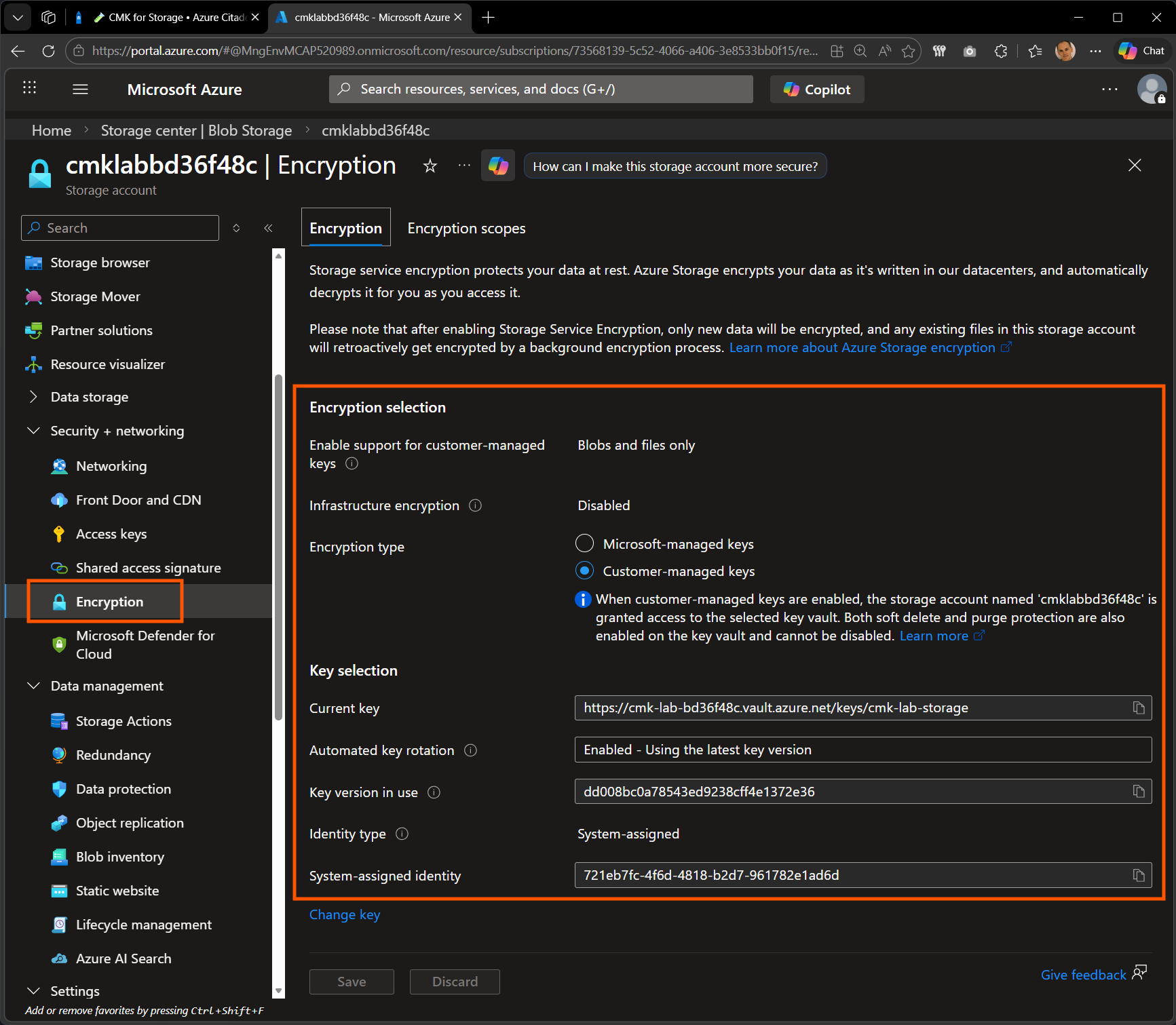
    Encryption blade showing the storage account configured with a customer-managed key from Key Vault

Standard operations such as blob upload are unchanged. The CMK encryption is transparent to the data plane.

Summary

As a reminder, here are the objectives achieved in this lab.

  • Created an RSA-HSM key in the Azure Key Vault Premium.
  • Created a storage account encrypted with that customer-managed key.
  • Verified that the encryption is in place and points at your key.
Source: https://www.azurecitadel.com/cmk/lab-storage/
Published: 06 Mar 2026
Printed:
L2: Encryption at rest with CMK 🧪 CMK for Storage 🧪 CMK for VM Disks and AKS