PAL tag with a service principal
In the final service principal scenario, we'll look at creating a service principal dedicated purely for recognition purposes.
Introduction
There are certain scenarios where the partner has had influence on a set of resources, say a specific subscription, but the customer does not need the partner to have ongoing access. Example scenarios:
- Consultative engagements (e.g. advisories) where contributor access was never required
- Proof of value pilot deployments which have been subsequently handed over to the customer team
- Highly secured production environments that only permit contributor access for workload identities, i.e. those used in CI/CD deployment pipelines
Historically these scenarios may have been recognised by a mechanism called Digital Partner of Record but DPOR has been retired.
On this page we will use a dedicated service principal that purely exists to “PAL tag” specific environments so that the partner receives the correct level of recognition.
The commands below use a Bash environment which includes both the Azure CLI and jq. (The Cloud Shell has both preinstalled.)
The page has two key steps that require certain permissions:
-
Create a service principal and partner admin link
By default, standard users can create service principals. Guest IDs cannot.
Standard users may not be able to create service principals if the Users can register applications setting has been toggled to no.
Either way, the Application Administrator or Application Developer roles in Entra allow service principal creation.
-
Create RBAC role assignments for the service principal
A privileged role is required to create RBAC role assignments, e.g.:
- Owner
- User Access Administrator
- Role Based Access Control Administrator
The two steps do not have to be run by the same person.
Create a service principal and PAL
-
Set a partner name variable.
The name will be used in the display name for the service principal in case there are multiple partners working in the customer account.
partnerName="<partnername>" -
Set a partner ID variable.
Remember to use the location-based partner ID.
partnerId="<partnerId>" -
Create the service principal
displayName="PAL (Partner Admin Link) for ${partnerName}"
json=$(az ad sp create-for-rbac --display-name "$displayName" --output json)
appId=$(jq -r '.appId' <<< $json)
secret=$(jq -r '.password' <<< $json)
tenantId=$(jq -r '.tenant' <<< $json)
az ad sp show --id $appId --output jsonc
By default, the service principal will have no RBAC role assignments.
-
Add an owner (optional)
myObjectId=$(az ad signed-in-user show --query id -otsv)
az ad app owner add --id $appId --owner-object-id $myObjectId
az ad app owner list --id $appId
You can also add owners in the portal.
-
Get the token
ℹ️ This approach uses the REST API to avoid having to switch IDs with the Azure CLI.
uri="https://login.microsoftonline.com/${tenantId}/oauth2/v2.0/token" data="grant_type=client_credentials&client_id=${appId}&client_secret=${secret}&scope=https://management.azure.com/.default" token=$(curl --silent --request POST --header "Content-Type: application/x-www-form-urlencoded" --data "$data" "$uri" | jq -r '.access_token') [[ -n "$token" ]] && cut -d. -f2 <<< $token | base64 --decode 2>/dev/null | jq '{aud, iss, tid, appid}' || echo "Error getting the token." -
Create the Partner Admin Link
uri="https://management.azure.com/providers/microsoft.managementpartner/partners/${partnerId}?api-version=2018-02-01" data='{"partnerId": "'${partnerId}'"}' curl --silent --request PUT --header "Authorization: Bearer ${token}" --header "Content-Type: application/json" --data "$data" "$uri" | jq . -
Remove the secret
You may remove the secret once the Partner Admin Link has been successfully created.
Removing the secret addresses potential security concerns and also removes the need to rotate secrets ahead of expiry dates.Delete the credential.
keyId=$(az ad app credential list --id $appId --query "[?displayName == 'rbac']|[0].keyId" -otsv)
az ad app credential delete --id $appId --key-id $keyId
The command has no output, but you will see that there is no secret in the Azure Portal in the next step.
Note that you will no longer be able to display that the partner admin link exists as you can no longer authenticate as the service principal.
-
View the App registrations.
-
Select the Partner Admin Link app registration in Owned Applications.
-
View the Certificates and secrets and confirm that there are no certs, secrets, or federated credentials.
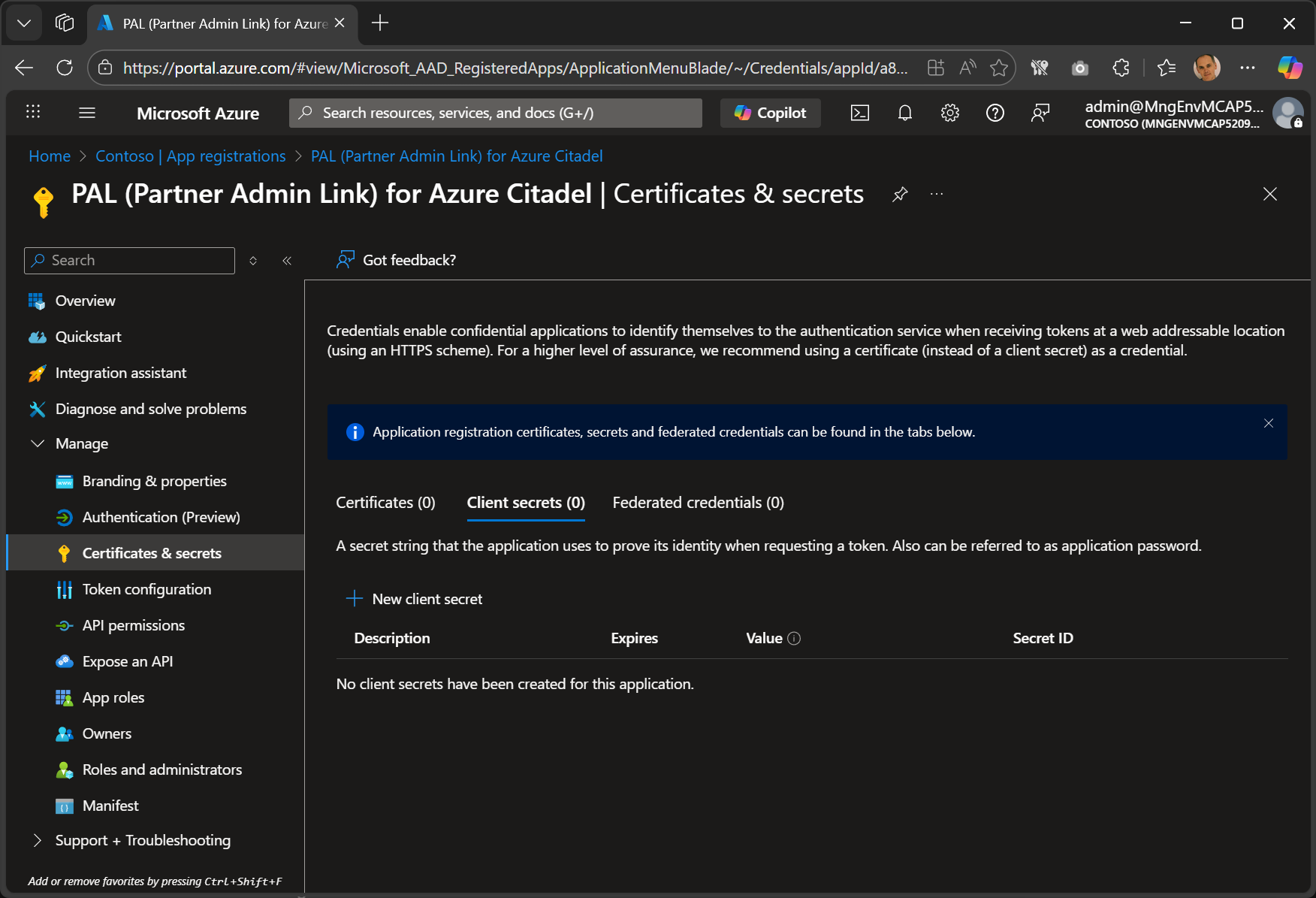
-
The service principal is now ready and RBAC role assignments can be created for it.
Create RBAC role assignments for the service principal
The recognition in Partner Admin Link is based on the RBAC role assignment scope points, and only applies to role assignments with a PEC eligible role. These examples use Support Request Contributor.
Remember, a privileged role is required to create RBAC role assignments, e.g.:
- Owner
- User Access Administrator
- Role Based Access Control Administrator
Recognition will associate the resource telemetry for all resources below the role assignment scope points.
Only assign roles to scope points that define the set of resources where the partner deserves recognition for their influence.
Note that the telemetry is always collected for Azure billing purposes. No new telemetry is collected, it is just associated withe the partner ID. The association solely indicates the positive influence that the partner has in the customer account and the partner does not have access to the telemetry itself except for a highly aggregated and anonymized number for the customer.
You can create the role assignments in the Azure Portal. Here is one way to do so:
- Open Resource Manager
- Click on Organization
- Select Management Group or Subscriptions.
- Select your scope point.
- Click on Access control (IAM) in the blade
- Click on + Add > Add role assignment
- Select the Support Request Administrator role, and click Next
- Click on + Select members, search for PAL and select the service principal
- Click on Review + assign and validate the assignment details
- Click on Review + assign again to create the RBAC role assignment
Repeat the process for other scope points if required.
Subscription example
This example creates an assignment for the current subscription.
objectId=$(az ad sp show --id $appId --query id -otsv)
role="Support Request Contributor"
scope="/subscriptions/$(az account show --query id -otsv)"
az role assignment create --role "$role" --scope "$scope" --assignee-object-id "$objectId" --assignee-principal-type "ServicePrincipal"
The scope point can be the resourceId for a subscription, resource group or individual resource.
The scope may also be set to a management group’s resourceId, in which case it will include all subscriptions underneath that management group.
Multiple subscriptions
This example creates the role assignment at all subscriptions within the service principal’s tenant based on your access.
objectId=$(az ad sp show --id $appId --query id -otsv)
role="Support Request Contributor"
upn=$(az ad signed-in-user show --query userPrincipalName -otsv)

subscriptionIds=$(az account list --refresh --only-show-errors --query "[?tenantId == '"${tenantId}"' && user.name == '"${upn}"'].id" -otsv)

for subscriptionId in $subscriptionIds
do az role assignment create --role "$role" --scope "/subscriptions/${subscriptionId}" --assignee-object-id "$objectId" --assignee-principal-type "ServicePrincipal"
done