Azure Citadel
  • Blogs

  • Azure Arc
    • Overview
    • Azure Arc-enabled Kubernetes
      • Prereqs
      • Background
      • Deploy Cluster
      • Connect to Arc
      • Enable GitOps
      • Deploy Application
      • Enable Azure AD
      • Enforce Policy
      • Enable Monitoring
      • Enable Azure Defender
      • Enable Data Services
      • Enable Application Delivery
    • Azure Arc-enabled Servers
      • Prereqs
      • Scenario
      • Hack Overview
      • Azure Landing Zone
      • Arc Pilot resource group
      • Azure Monitoring Agent
      • Additional policy assignments
      • Access your on prem VMs
      • Create onboarding scripts
      • Onboarding using scripts
      • Inventory
      • Monitoring
      • SSH
      • Windows Admin Center
      • Governance
      • Custom Script Extension
      • Key Vault Extension
      • Managed Identity
    • Useful Links
  • Azure CLI
    • Install
    • Get started
    • JMESPATH queries
    • Integrate with Bash
  • Azure landing zone
    • ALZ Accelerator
      • Prereqs
      • Elevate
      • Bootstrap
      • Demote
      • Components
    • Deploy an Azure landing zone
      • Create an initial ALZ config
      • Add a local override library
      • Test locally
      • Run through the CI/CD workflow
    • Libraries
      • What is a library?
      • Policies, Assignments and Roles
      • Archetypes, Overrides and Architecture
      • Metadata and Policy Default Values
      • Custom libraries
    • Example Library Configs
      • Azure landing zone library
      • Azure landing zone library with overrides
  • Azure Lighthouse
    • Minimal Lighthouse definition
    • Using service principals
    • Privileged Identity Management
  • Azure Policy
    • Azure Policy Basics
      • Policy Basics in the Azure Portal
      • Creating Policy via the CLI
      • Deploy If Not Exists
      • Management Groups and Initiatives
    • Creating Custom Policies
      • Customer scenario
      • Policy Aliases
      • Determine the logic
      • Create the custom policy
      • Define, assign and test
  • Marketplace
    • Introduction
      • Terminology
      • Offer Types
    • Partner Center
    • Offer Type
    • Publish a VM Offer HOL
      • Getting Started
      • Create VM Image
      • Test VM Image
      • VM Offer with SIG
      • VM Offer with SAS
      • Publish Offer
      • Other VM Resources
    • Publish a Solution Template HOL
      • Getting Started
      • Create ARM Template
      • Validate ARM Template
      • Create UI Definition
      • Package Assets
      • Publish Offer
    • Publish a Managed App HOL
      • Getting Started
      • Create ARM Template
      • Validate ARM Template
      • Create UI Definition
      • Package Assets
      • Publish Offer
    • Managed Apps with AKS HOL
    • Other Managed App Resources
    • SaaS Offer HOLs
    • SaaS Offer Video Series
      • Video 1 - SaaS Offer Overview
      • Video 2 - Purchasing a SaaS Offer
      • Video 3 - Purchasing a Private SaaS Plan
      • Video 4 - Publishing a SaaS Offer
      • Video 5 - Publishing a Private SaaS Plan
      • Video 6 - SaaS Offer Technical Overview
      • Video 7 - Azure AD Application Registrations
      • Video 8 - Using the SaaS Offer REST Fulfillment API
      • Video 9 - The SaaS Client Library for .NET
      • Video 10 - Building a Simple SaaS Landing Page in .NET
      • Video 11 - Building a Simple SaaS Publisher Portal in .NET
      • Video 12 - SaaS Webhook Overview
      • Video 13 - Implementing a Simple SaaS Webhook in .NET
      • Video 14 - Securing a Simple SaaS Webhook in .NET
      • Video 15 - SaaS Metered Billing Overview
      • Video 16 - The SaaS Metered Billing API with REST
  • Microsoft Fabric
    • Theory
    • Prereqs
    • Fabric Capacity
    • Set up a Remote State
    • Create a repo from a GitHub template
    • Configure an app reg for development
    • Initial Terraform workflow
    • Expanding your config
    • Configure a workload identity
    • GitHub Actions for Microsoft Fabric
    • GitLab pipeline for Microsoft Fabric
  • Packer & Ansible
    • Packer
    • Ansible
    • Dynamic Inventories
    • Playbooks & Roles
    • Custom Roles
    • Shared Image Gallery
  • Partner Admin Link
    • Understanding PAL
    • Service principals with credentials
    • PAL tagging with a service principal
    • CI/CD pipelines & OpenID Connect
    • User and guest IDs
    • Azure Lighthouse & PAL
    • PAL FAQ
  • REST API
    • REST API theory
    • Using az rest
  • Setup
  • Sovereign landing zone
    • ALZ Accelerator
      • Prereqs
      • Elevate
      • Bootstrap
      • Demote
      • Components
    • Deploy Sovereign landing zone
      • Create an initial SLZ config
      • Add a local override library
      • Test locally
      • Run through the CI/CD workflow
    • Libraries
      • What is a library?
      • Policies, Assignments and Roles
      • Archetypes, Overrides and Architecture
      • Metadata and Policy Default Values
      • Custom libraries
    • Reference Library Configs
      • Sovereign landing zone
      • Sovereign landing zone library with overrides
      • SLZ extended with a country pack
  • Terraform
    • Fundamentals
      • Initialise
      • Format
      • Validate
      • Plan
      • Apply
      • Adding resources
      • Locals and outputs
      • Managing state
      • Importing resources
      • Destroy
    • Get set up for Terraform
      • Cloud Shell
      • macOS
      • Windows with PowerShell
      • Windows with Ubuntu in WSL2
    • Using AzAPI
      • Using the REST API
      • azapi_resource
      • Removing azapi_resource
      • azapi_update_resource
      • Data sources and outputs
      • Removing azapi_update_resource
  • Virtual Machines
    • Azure Bastion with native tools & AAD
    • Managed Identities

  • About
  • Archive
  1. Home
  2. Blog
  3. GitHub Copilot CLI and WorkIQ

Table of Contents

  • WSL2 Issue
  • Workaround
  • Installing Work IQ at the Windows OS level
  • Reconfiguring Work IQ in WSL2
  • Work IQ in use

GitHub Copilot CLI and WorkIQ

Richard Cheney • 12 Feb 2026

Table of Contents

  • WSL2 Issue
  • Workaround
  • Installing Work IQ at the Windows OS level
  • Reconfiguring Work IQ in WSL2
  • Work IQ in use

How do you add Work IQ as an MCP server if your GitHub Copilot CLI is running in WSL2? Here is an option that was shared with me when I hit into a security policy at work. I thought I’d pass it forward.

Adding MCP tools into GitHub Copilot gives an amazing extensibility and also allow Copilot’s various models to reason across context from multiple sources. In the last blog I added the Microsoft Learn MCP server to GitHub Copilot (GHCP) which I run in Ubuntu in WSL2.

Microsoft’s three IQ products were announced at Ignite back in November and extend Microsoft 365 Copilot with greater context:

  • Work IQ provides insights into you, your organisation, people you work with, and your work
  • Fabric IQ enables analytics and business intelligence across the data estate and its ontology
  • Foundry IQ offers amazing agentic RAG grounding with defined knowledge bases and extended knowledge source support

We’ll see lots of use cases with agentic AI leveraging these - and often together - but I thought I’d start simple and bring my work context into my conversations with GitHub Copilot.

WSL2 Issue

After following the official Work IQ MCP preview instructions it all looked good, but I then came up against a security policy issue that prevented me from using it. Work IQ was permitted on enrolled devices, and WSL2’s subsystem does not show up that way.

Workaround

The answer is to reconfigure the MCP server to run at the Windows OS level, rather than natively in the WSL2 subsystem. THis is easy as WSL2 supports running Windows commands directly within the subsystem.

Here’s how to configure it.

Installing Work IQ at the Windows OS level

Open PowerShell as admin. (I right click on the Windows icon, select Terminal (Admin), and then open PowerShell 7.)

  1. Install NodeJS if you don’t have it.

    winget install OpenJS.NodeJS.LTS
    
  2. Find the most recent tarball for Work IQ

    npm view @microsoft/workiq dist.tarball
    
    Example output
    https://registry.npmjs.org/@microsoft/workiq/-/workiq-0.2.8.tgz
    

    Or run the command without dist.tarball to get detailed release info (from npm help view).

    npm view @microsoft/workiq
    
    Example output
    @microsoft/workiq@0.2.8 | SEE EULA | deps: none | versions: 4
    MCP server for Microsoft 365 Copilot
    https://github.com/microsoft/work-iq-mcp#readme
    
    keywords: copilot, m365, mcp, mcp-server, ai, agents, workiq
    
    bin: workiq
    
    dist
    .tarball: https://registry.npmjs.org/@microsoft/workiq/-/workiq-0.2.8.tgz
    .shasum: f1b934c506994cde6c87a94e00349f792d105ff7
    .integrity: sha512-pbgnJDLPGrsYb5mCY6WzFtUNcRwSHkll7phgx+DZXSDbZoPs6mDJtQ2s39606Rp8qpx7b3OrkfFOr0SuzPIVEA==
    .unpackedSize: 119.0 MB
    
    maintainers:
    - microsoft1es <npmjs@microsoft.com>
    - microsoft-oss-releases <microsoft-oss-publishing@microsoft.com>
    
    dist-tags:
    latest: 0.2.8
    
    published 2 weeks ago by microsoft1es <npmjs@microsoft.com>
    
  3. Install Work IQ globally

    npm.cmd install -g https://registry.npmjs.org/@microsoft/workiq/-/workiq-0.2.8.tgz
    
  4. Close down and then reopen PowerShell

  5. Accept the EULA

    workiq.cmd accept-eula
    
  6. Test it out

    workiq.cmd ask --question "Who is my manager?"
    

Reconfiguring Work IQ in WSL2

  1. Open GitHub Copilot CLI

    copilot
    
  2. Remove the workiq plugin

    The default commands install Work IQ as a plugin using npx. If you have it and need too remove it:

    /plugin uninstall workiq
    
  3. Add in the WorkIQ MCP server

    /mcp add WorkIQ
    

    This will open up the interactive MCP addition and the name will have been prepopulated.

    • Leave the Server Type as Local.

    • Set the Command

      powershell.exe -c "workiq.cmd mcp"
      

    Leave the other fields as default and save with ctrl+s.

  4. Display the MCP server

    /mcp show WorkIQ
    
    Example Output
    ● MCP Server: WorkIQ
    
      Type: local
      Command: powershell.exe
      Status: Enabled
    
      Tools (2/2 enabled):
        ✓ accept_eula: Accept the End User License Agreement (EULA) to enable full ...
        ✓ ask_work_iq: Ask a question to Microsoft 365 Copilot for information abou...
    
  5. Display as JSON

    You can run shell commands within GutHub Copilot CLI by either prefixing them with ! or by using *shift+tab. Either way will switch you into the yellow Shell mode.

    jq < ~/.copilot/mcp-config.json
    
    Example mcp-config.json
    {
      "mcpServers": {
        "MicrosoftLearn": {
          "tools": [
            "*"
          ],
          "type": "http",
          "url": "https://learn.microsoft.com/api/mcp",
          "headers": {}
        },
        "WorkIQ": {
          "type": "local",
          "command": "powershell.exe",
          "tools": [
            "*"
          ],
          "args": [
            "-c",
            "workiq.cmd mcp"
          ]
        }
      }
    }
    

Work IQ in use

Now that Work IQ is configured as an MCP server, you can ask GitHub Copilot CLI questions about your work context and it will use the WorkIQ MCP to query your Microsoft 365 data.
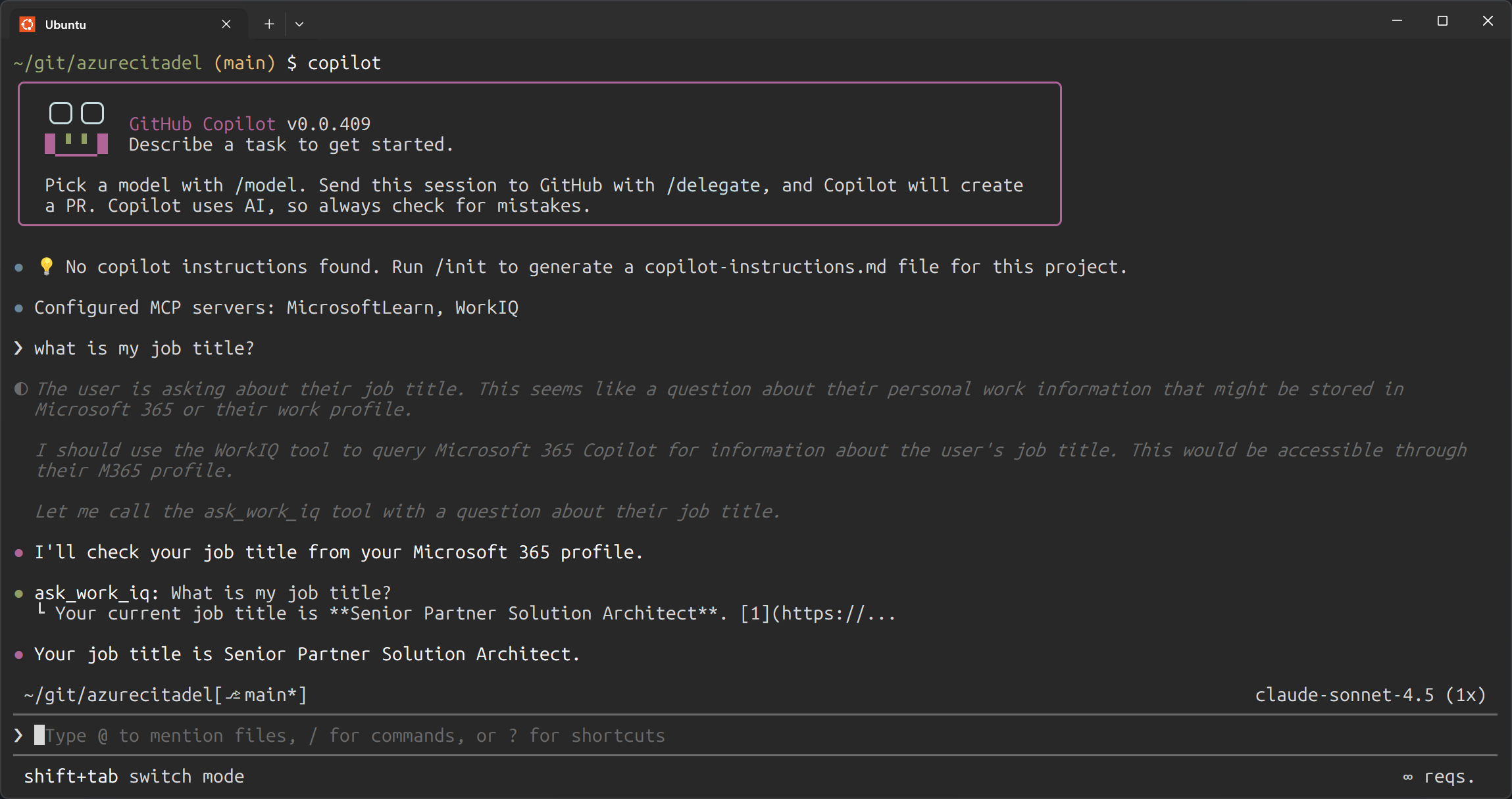
GitHub Copilot CLI with WorkIQ:
GitHub Copilot CLI with WorkIQ MCP server displaying a question about work context being answered using Microsoft 365 data

This demonstrates the power of combining GitHub Copilot CLI with Work IQ - you can now ask questions about your work context and get answers directly within your development workflow.

Source: https://www.azurecitadel.com/blog/2026-02-13-github-copilot-workiq/
Author: Richard Cheney
Published: 12 Feb 2026
Printed: